Databox
Pricing

Goals & OKRs

Set more accurate goals, and make sure the whole company hits them

Set a target on any metric, connect individual goals to company objectives, and give your AI Analyst the context that makes every answer more relevant.

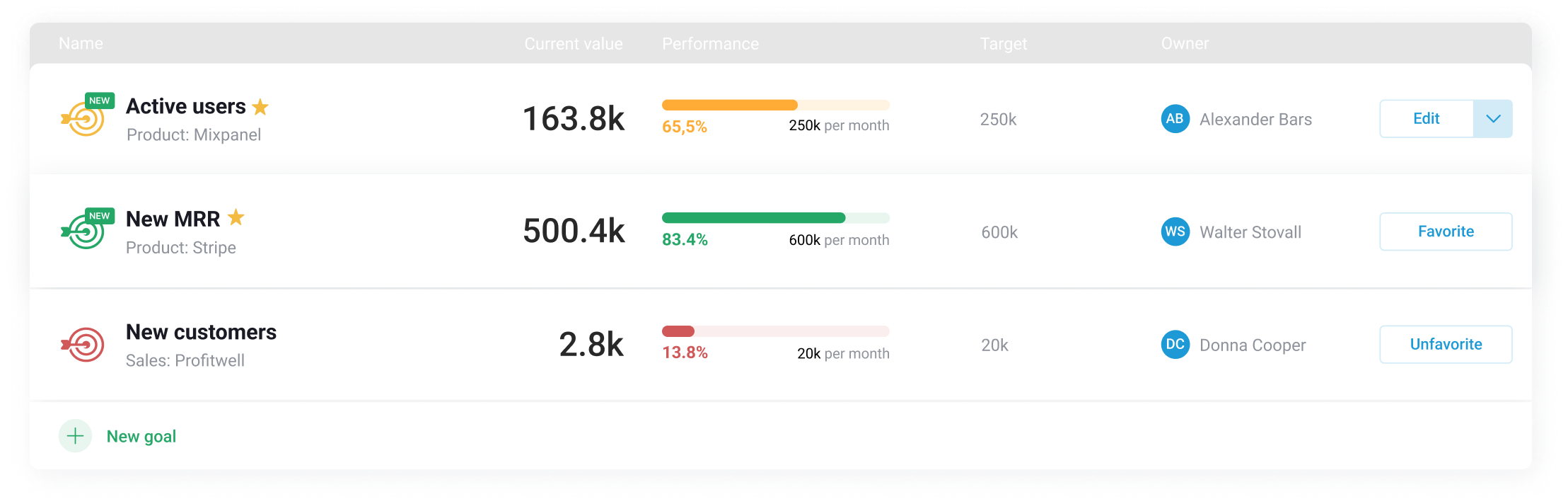
Databox Goals and OKRs strategy map with objectives, progress bars and owners

Trusted by 20,000+ teams worldwide

Every goal connected to the data behind it

Goals and OKRs turns any metric you track in Databox into a target. Give each goal an owner and a deadline, connect them to company objectives, and watch progress update automatically from live data. Your AI Analyst uses those goals as context, so its answers reflect what success looks like for your business.

Creating a goal on a live New Customers metric in Databox
“Databox is a big part of our data and goal-driven approach at Referral Rock. Out of the box we’re able to get many insights from all the martech tools we are already using. The near real-time data helps us know where we are on our goals at practically any given moment instead of rushing around at the end of the month to see where we landed.”
Joshua Ho Joshua Ho Co-founder & CEO, Referral Rock

Set a goal for any metric

Turn any metric you track into a goal, or set one manually, and let progress update itself.

Creating a goal on the MRR metric from its chart
Metric-based or manual goals

Set a goal on any metric you track, including custom ones you built, or enter a number manually.

Choosing between an automatic metric-based goal and a manual one
Automatic progress updates

When a goal is built on a metric, Databox pulls the latest data from the source and updates progress in real time, so you always know where you stand.

Goal card showing 91% progress towards 200 upgrades, updated automatically
Progress alerts

Get notified in email, Slack, or the mobile app when a goal is on track, at risk, or off track, early enough in the cycle to still do something about it.

Notification reading you achieved your goal, with 176 new customers this month

OKRs

Align every team with Objectives and Key Results (OKRs)

Connect company objectives to the goals each team and person owns, so everyone sees how their work ladders up.

Objectives dashboard with on track, at risk and off track counts beside the aligned goals list
Objectives with sub-goals

Link sub-goals to a company objective, and the parent's progress rolls up automatically as each sub-goal moves.

An objective expanded to show its sub-goals and the teams that own them
Clear ownership

Assign every goal and objective to a person or team, so it's always clear who's accountable for what.

Goal owner panel showing the sales team members assigned to a goal
Goal timeframes

Add an end date to each objective and goal, so everyone knows exactly what to hit and by when.

Timeframe picker offering a full fiscal year, halves, quarters or a continuous goal

Keep strategy visible at every level

Give everyone one place to see the plan, who owns what, and where things stand.

Strategy overview

Publish your mission, vision, and objectives alongside the numbers, so teams know what they're working toward and why it matters.

Strategy view pairing vision and mission with objective status and aligned goals
List view and strategy map

Switch between a list view for progress detail and a strategy map for the full picture of how everything connects.

Goals shown side by side as a list view and as a strategy map

Unlock more of your data

More than goal tracking. Context your AI Analyst works from.

Every Databox plan comes with an AI Analyst built in. The goals you set become part of what it knows, so every answer, on any metric, is measured against what success looks like for you.

Creates goals with a single prompt

Your AI Analyst can help you analyze metrics, suggest goal targets and sets it up for you.

Answers with your target in mind

Ask how a metric is doing, and your AI Analyst tells you whether you're on pace to hit it, not just where it stands today.

Knows what's important to you

Add your company's vision, mission, and objectives, so your AI Analyst always has the bigger picture behind every number.

AI Analyst working through a trend analysis with the goals it has context for

One tool to keep every team aligned

Databox connects every goal to live performance data from 130+ integrations, and includes unlimited users, so alignment can reach the whole company.

Executives

Set the mission, vision, and top-level objectives, then see how every department's goals ladder up to them, without logging in and out of separate tools.

An executive presenting while an objectives summary shows on track, at risk and off track counts

Department leaders

Turn the objectives you own into team goals on real metrics, and see at a glance which ones are on pace and which need attention.

Two department leaders reviewing an objective at 90.3% progress with its sub-goals

Analysts

Build the goals on the metrics you already maintain, so progress updates itself from live data instead of a monthly spreadsheet.

An analyst beside a performance methodology objective tracking at 82%

Agencies

Track every client's goals in one place, and share progress with each of them through a live view that needs no login.

An agency team working together beside client goals for an up-market campaign
4.4
4.6

Start hitting your goals

Track all your objectives in one place, and promote accountability and transparency.

No credit card needed · Free-forever plan
Strategy tree showing two objectives at 90.3% and 82% progress

Learn more

Frequently asked questions

What is OKR software?

OKR software helps teams set Objectives and Key Results, then tracks progress toward them automatically from live data. Databox’s Goals & OKRs connects each goal to a real metric, so progress updates itself and ladders up from individual and team goals to company-wide objectives.

What’s the difference between a goal and an OKR in Databox?

A goal is a target set on a single metric, with or without a deadline. An OKR pairs a broader objective with measurable key results, and you can link individual goals as sub-goals of an objective, so the parent’s progress rolls up automatically as each one moves.

Can I get alerted if I’m unlikely to hit a goal?

Yes. You can set two kinds of Alerts — the first notifies you if you are likely/unlikely to hit your goal after 70% of the specific time period has passed, and the second tells you whether or not you’ve hit your goal once the period has expired.

Do I need to be a Databox user to track goals?

Only Databox users can create Goals and track them on the Goals page. But Goals can be added to your dashboards using the Gauge or Progress visualization type, so anyone with access to the dashboard (including non-users) can track them.

Can agencies track goals across every client in one place?

Yes. You can use the Goals Overview to track all the goals you have set up for your clients in one place.

Can I set a goal based on a percentage increase?

At the moment, you can only set goals using specific numerical values. If you’d like goals based on percentage increase, feel free to upvote this on our roadmap.

Can I add a goal to a dashboard?

Yes! Drag and drop a visualization type that supports Goals onto your dashboard. Learn more here.

Can Databox track OKRs automatically from connected data?

Yes. Link an OKR’s key results to metrics you already track, and progress updates itself from live data instead of a manual check-in, so the objective’s overall progress rolls up automatically as each key result moves.